
It is essential to master the SQL interview questions for experienced professionals to crack the most challenging interview rounds. Your in-depth knowledge of SQL is vital for dealing with large amounts of data, retrieving specific results, or drawing quick insights.
If you are applying for data scientists or data engineer positions at FAANG+ companies, you must go through the most commonly asked SQL interview questions for experienced professionals. You must also practice SQL query interview questions for experienced professionals to ace the interview. These questions will help you assess your SQL tech interview preparation and also help you clear some of the crucial concepts.
In this article, we will cover the top SQL interview questions for experienced professionals. We will also go over SQL query interview questions and Oracle PL/SQL interview questions and answers for experienced professionals.
You must go through the following curated list of SQL interview questions for experienced professionals, which are likely to be asked during the SQL interview.
The process of organizing fields and tables of a database to minimize redundancy and dependency. It allows you to add, delete or modify fields that can be incorporated into a single table. The different normalizations are as follows:
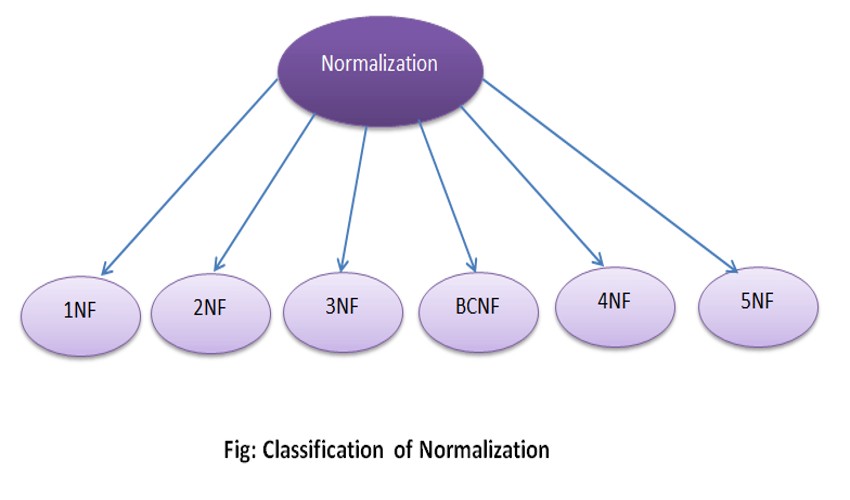
This is one of the most commonly asked SQL interview questions for experienced professionals and you can answer this by explaining the denormalization technique. With this technique, you can access the data from higher to lower normal forms of the database. As the name suggests, it is a reversal of normalization, i.e., it introduces redundancy into a table as it incorporates data from the related tables
It is a set of rules determining how character data can be sorted and compared. You can use collation to compare A and other language characters. It depends on the width of the characters. You can use ASCII values to compare these character data.
The different types of collation sensitivity are as follows:

When preparing for SQL interview questions for experienced professionals, it’s crucial to understand CASE statements. A CASE statement is used to check certain conditions and return a value based on whether the conditions are evaluated as true. CASE allows you to bring logic, conditions, and order in combination with clauses like WHERE and ORDER BY.
A CASE expression is different from a CASE statement. An expression evaluates a list of conditions. It returns one of the multiple possible result expressions. Its result is a single value, whereas a CASE statement result is the execution of a sequence of statements.
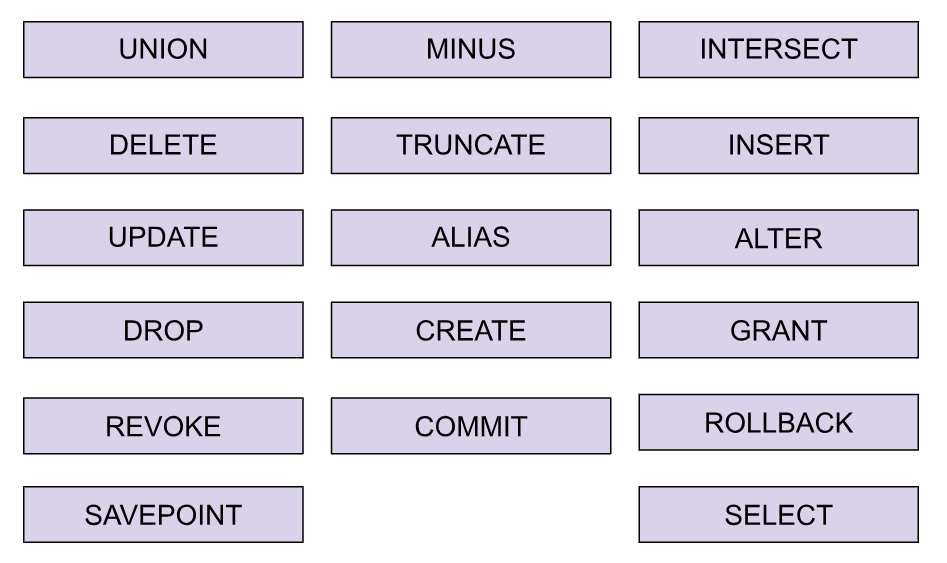
SQL commands are important to understand for SQL interview questions for experienced professionals. Some common commands you need to know are as follows:
A CTE is a table expression of data defined by columns and rows that a Query can compute from other tables. Thereby, making it easier to read and maintain a code, especially for complex queries. CTEs are also helpful for recursive queries or to divide a large query into multiple smaller parts.
Here is a simple example:
WITH CTE_Example AS (
   SELECT customer_id, COUNT(order_id) AS total_orders
   FROM orders
   GROUP BY customer_id
)
SELECT *
FROM CTE_Example
WHERE total_orders > 5;
You can answer this SQL interview question for experienced professionals by using the following table to highlight the main differences between SQL and other programming languages:
| SQL | Other Programming Languages |
| SQL is a declarative language, which means that it is used to describe what data is needed rather than how to get it. | Other programming languages such as C++, Java, or Python are imperative, meaning that they describe how to get the data. |
| SQL is specifically designed for working with relational databases. | Other programming languages are generally more general-purpose |
| SQL is a set-based language, which means that it works with sets of data at a time rather than individual data elements. | Other programming languages are more procedural, meaning that they work with individual data elements. |
| SQL is used to manipulate and query data. | Other programming languages are more procedural, meaning that they work with individual data elements. |
| SQL is usually used in the context of a database management system (DBMS) which is software that interacts with databases. | Other programming languages can be used to build standalone applications. |
In SQL, the main data types are as follows:
You can answer this SQL interview question for experienced professionals by using the following table to explain how to use Select, Insert, Update, and Delete Data in SQL.
| Action in SQL | Basic Syntax |
| Select Data | SELECT column1, column2,… FROM table name WHERE condition: |
| Insert Data | INSERT INTO table name (column1, column2, …) VALUES (value1,value2….): |
| Update Data | INSERT INTO table name (column1, column2, …) VALUES (valuel, value2….): |
| Delete Data | DELETE FROM table_name WHERE condition: |
A primary key is a column or set of columns in a table that uniquely identifies each row in the table. It is used to enforce the integrity of the data in the table and to create relationships with other tables.
A foreign key is a column or set of columns in a table that references the primary key of another table. It is used to enforce referential integrity and to create relationships between tables.
This is one of the most commonly asked SQL interview questions for experienced professionals. To create a table and its constraints in SQL, you can use the CREATE TABLE statement. Here is an example of how to create a table called “orders” with a primary key and a foreign key:
CREATE TABLE orders (
 order_id INT PRIMARY KEY,
 customer_id INT,
 order_date DATE,
 FOREIGN KEY (customer_id) REFERENCES customers(customer_id)
);
JOINs in SQL are used to combine data from two or more tables based on a related column between them. There are several types of JOINs, including INNER JOIN, LEFT JOIN, RIGHT JOIN, and FULL OUTER JOIN.
An example of using an INNER JOIN in SQL would be as follows:
SELECT *
FROM orders
JOIN customers
ON orders.customer_id = customers.customer_id;
Aggregate functions in SQL are used to perform calculations on a set of values and return a single value. Common aggregate functions include COUNT, SUM, AVG, MIN, and MAX.
An example of using the SUM aggregate function in SQL would be:
SELECT SUM(price)
FROM products;
A subquery is a query that is nested inside another query, and it is used to return a set of results that will be used by the outer query. Subqueries can be used in various parts of a SQL statement, such as:
Here is an example of how to use a subquery in the WHERE clause of a SELECT statement:
SELECT * FROM orders
WHERE customer_id IN (SELECT customer_id FROM customers WHERE country = ‘USA’);
A temporary table is a table that exists only for the duration of a session or a transaction and is typically used to store intermediate results for a complex query. To create a temporary table in SQL, you can use the CREATE TEMPORARY TABLE statement, like this:
CREATE TEMPORARY TABLE temp_table AS
SELECT customer_id, SUM(amount) FROM orders GROUP BY customer_id;
To ensure your SQL queries run efficiently and troubleshoot any issues, consider the following techniques:
Indexing: Create indexes on columns that are frequently used in search or sort operations. Indexes speed up data retrieval but be cautious as they can also affect write performance.
Query Execution Plan: Profile the execution plan of your query to pinpoint slow or inefficient components. Tools like EXPLAIN or EXPLAIN ANALYZE in your SQL environment can help visualize how the database executes your query.
Performance Monitoring Tools: Use tools such as pgAdmin, MySQL Workbench, or SQL Server Management Studio to monitor performance metrics, including CPU and memory usage. These tools provide insights into how your queries impact system resources.
Parameter Testing: Run your queries with different parameters and datasets to identify issues related to specific values or data conditions. This helps in understanding how different inputs affect query performance.
Query Simplification: Break down complex queries into smaller, manageable parts. Simplifying queries can help isolate performance issues and make them easier to troubleshoot.
By employing these strategies, you can enhance the efficiency of your SQL queries and resolve performance issues more effectively.
Indexes in SQL are used to improve the performance of queries by allowing the database management system (DBMS) to quickly locate and retrieve the requested data.
An index is a separate data structure that is associated with a table and contains a copy of the data from one or more columns of the table, along with a pointer to the location of the corresponding rows in the table.
For example, to create an index on the “customer_id” column of the “orders” table, you would use the following SQL statement:
CREATE INDEX idx_customer_id ON orders (customer_id);
Views in SQL are virtual tables that are based on the result of a SELECT statement. They do not store data themselves, but rather provide a way to access data from one or more tables in a specific way, such as by filtering, joining, or aggregating the data.
For example, to create a view that shows all orders with a total price greater than $100, you would use the following SQL statement:
CREATE VIEW high_value_orders AS SELECT * FROM orders WHERE total_price > 100;
In SQL, NULL values represent missing or unknown data. When working with NULL values in SQL, it’s important to understand the difference between NULL and an empty string or a zero value.
There are several ways to handle NULL values in SQL:
SELECT * FROM customers WHERE last_name IS NOT NULL;
SELECT COALESCE(last_name, ‘N/A’) AS last_name FROM customers;
SELECT * FROM orders WHERE total_price > 100 OR total_price IS NULL;
It’s important to note that when using any comparison operator other than IS NULL or IS NOT NULL, with a NULL value, it will return false, so you need to use the IS NULL or IS NOT NULL operator to handle NULL values in the comparison.
Security questions are quite common SQL interview questions for experienced professionals. Implementing security in SQL involves a combination of several different techniques, including:
The interviewers might present a SQL query and ask questions on the same. They can also ask you to write SQL queries. Here are some SQL query interview questions for experienced professionals.
To display the current date in SQL, you can use the GETDATE() function:
Query 1: SELECT GETDATE();
Alternatively, depending on the database system, you can also use:
Query 2: SELECT NOW();Â Â — This returns the current date and time
To verify if the data passed to a query is in the format “DD/MM/YY,” you can use the ISDATE() function along with the appropriate format string:
SELECT ISDATE(‘DD/MM/YY’)
This will return 1 if the passed data is in the format “DD/MM/YY” and 0 otherwise.
Please keep in mind that the above query only check the passed string format and not the actual data, to check if the data passed to the query is in the format “DD/MM/YY” and is a valid date you can use the following query
SELECT CASE
      WHEN ISDATE(your_date_column) = 1 AND your_date_column like ‘__/__/__’ THEN ‘valid date’
      ELSE ‘invalid date’
    END as ‘date_status’
SELECT name
FROM candidates
WHERE birth_date BETWEEN ‘1970-09-08’ AND ‘1975-11-30’;
SELECT name
FROM employees
WHERE name LIKE ‘S%’;
This query retrieves all employee names from the employee’s table where the name starts with the letter ‘S’. The % is a wildcard that matches any sequence of characters following ‘S’.
SELECT *
FROM employees WHERE salary <= 10000;
This query retrieves all records from the employee’s table where the salary is less than or equal to 10,000.
SELECT MONTH(date_column)
FROM table_name;
This query retrieves the month (as a number between 1 and 12) from the date_column in the table_name.
To join three tables containing two NULL values, you can use the LEFT JOIN clause. The LEFT JOIN returns all rows from the left table, and the matched rows from the right table. If there is no match, NULL values will be returned for the right table’s columns:
SELECT *
FROM table1
LEFT JOIN table2 ON table1.column_name = table2.column_name
LEFT JOIN table3 ON table2.column_name = table3.column_name
To fetch the first three characters of the employee name from a table called “employee” and a column called “name”, you can use the SUBSTRING() function:
SELECT SUBSTRING(name, 1, 3) as ‘name_first_3’
FROM employee;
This query will return a new column called “name_first_3” containing the first three characters of the “name” column for each employee.
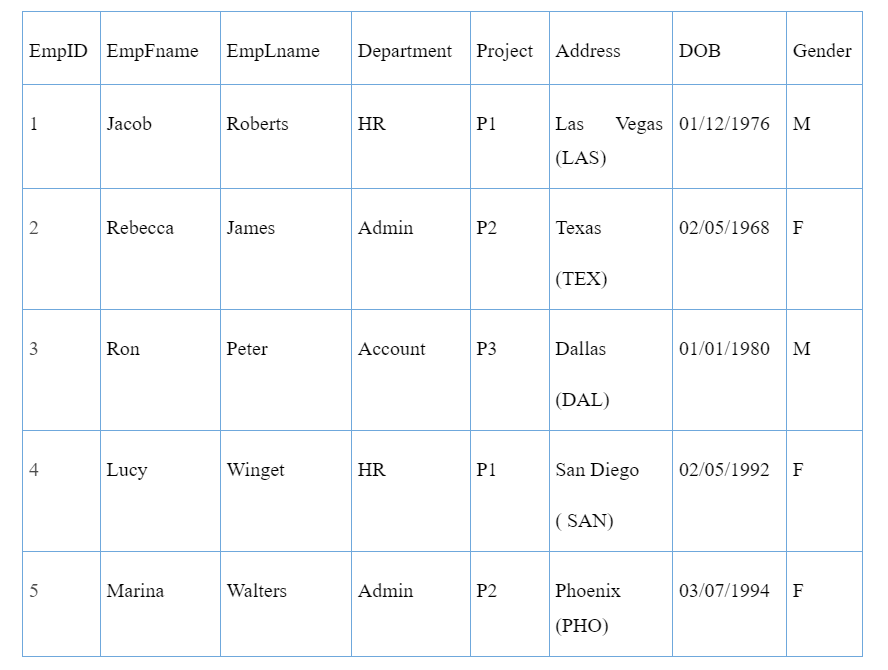
Answer the following SQL query interview questions with reference to the above table:
SELECT UPPER(EmpFname) AS EmpName
FROM Employee;
SELECT COUNT(*)
FROM Employee WHERE Department=’HR’;
SELECT SUBSTR(EmpLname,1,4)
FROM Employee WHERE EmpLname LIKE ‘W%’;
SELECT SUBSTRING_INDEX(Address,'(‘,1) as Place
FROM Employee;
SELECT EmpFname
FROM Employee WHERE EmpFname LIKE ‘R%’;
Recommended Reading:Â SQL query interview questions based on a sample data table
With three years of experience, you are expected to have all the basic knowledge of SQL and database management. These SQL interview questions for 3 years experience are a good way to test your skills and knowledge in SQL.
Constraints are the rules that we can use to limit the type of data in a table. In other words, we may use constraints to limit the kind of data that can be recorded in a specific column of a table.
Data integrity is defined as the correctness and consistency of the data included in the database. For this purpose, the data recorded in the database must adhere to specific procedures (rules). The data in a database must be accurate and consistent and the data saved in databases must always adhere to the rules. DBMS offers various ways to establish such constraints.
T-SQL, or Transact-SQL, is best used with the Microsoft SQL Server. It extends the standard SQL language and it adds features such as procedural programming, error handling, and transaction control. This enables complex data manipulation and management tasks that are capable beyond SQL. T-SQL is vital for anyone working with database environments of SQL Server.
Oracle created PL/SQL to overcome the disadvantages of SQL. It allows easier building and handling of critical applications. The following Oracle PL/ SQL interview questions for experienced professionals will help you brush up on the concepts:
PL/SQL (Procedural Language/Structured Query Language) is an extension of SQL that is used for developing stored procedures, functions, and triggers in an Oracle database. It provides several features that make it a better option than plain SQL for certain types of tasks:
To debug your code in PL/SQL, you can use the following methods:
It’s important to note that debugging PL/SQL can be more involved than debugging other programming languages, and it may require knowledge of the specific database and tools you are using.
| Aspect | Mutating Table | Constraining Table |
| Definition | A table that is currently being modified by a DML (Data Manipulation Language) statement. | A table that is referenced by a foreign key constraint from another table. |
| Usage Context | Occurs during the execution of triggers when a table is being updated or deleted. | Used to ensure data integrity by referencing primary keys of other tables through foreign key constraints. |
| Issues | Can cause issues with triggers since the changes may not be visible yet or may be inconsistent. | Ensures consistency and integrity between related tables but can enforce referential integrity rules. |
| Trigger Restrictions | Triggers on mutating tables cannot read or modify the table that is being modified | No such restrictions related to triggers; constraints are enforced at the database schema level. |
| Example | An UPDATE or DELETE statement on a table that is referenced within a trigger on the same table. | A table with a foreign key that references the primary key of another table to maintain referential integrity. |
The outcome of the execution of a DML statement is saved in the database. DML statements are used to modify the data in the database, so any changes made will be persisted in the relevant tables. These changes can be committed or rolled back, depending on the transaction management in use, with committed changes being permanent and visible to other sessions, and rolled-back changes being discarded and not visible to other sessions.
Virtual tables available during the execution of a database trigger include:
SYS.ALL_DEPENDENCIES is a view in the Oracle database that shows all dependencies between objects in the database. This view can be used to determine the dependencies between objects such as:
The significance of this view is that it can be used to track dependencies between objects in a database and ensure that changes to one object do not break any other objects that depend on it. It can also be used to help identify and resolve issues related to object invalidation and to help plan and manage upgrades and migrations of the database.
In PL/SQL, %TYPE and %ROWTYPE are used to declare variables. The difference between them are mentioned in tha table:
| %TYPE | %ROWTYPE |
| %TYPE is used to declare a variable with the same data type as an existing database column or variable | %ROWTYPE is used to declare a variable that can hold an entire row of a database table or a database cursor. |
| It is used when you want to create a variable that has the same data type as a column in a table or another variable | It is used to declare a variable that can store an entire row from a table or cursor. |
| For example, if you have a table named “Employee” with a column named “EmpID” of type NUMBER, you can declare a variable named “EmpNo” with the same data type as the “EmpID” column by using the following syntax: EmpNo Employee.EmpID%TYPE; |
For example, if you have a table named “Employee” you can declare a variable named “EmpRec” that can store an entire row from the Employee table using the following syntax: EmpRec Employee%ROWTYPE |
DECLARE
  num NUMBER := 123; — Three-digit number
  sum NUMBER := 0; — Variable to store the sum
BEGIN
  sum := sum + num MOD 10; — Add the units digit
  num := num DIV 10; — Remove the units digit
  sum := sum + num MOD 10; — Add the tens digit
  num := num DIV 10; — Remove the tens digit
  sum := sum + num MOD 10; — Add the hundreds digit
  DBMS_OUTPUT.PUT_LINE(‘Sum of digits: ‘ || sum); — Print the sum
END;
In this code:
This is one of the most commonly asked SQL interview questions for experienced professionals. Exception handling is a mechanism that allows a program to handle errors and unexpected conditions in a controlled and predictable manner. It is a process of dealing with runtime errors that occur during the execution of a program. PL/SQL provides a rich set of predefined exceptions and also allows you to define your own exceptions.
Exceptions can be handled using the EXCEPTION block, where you can catch and handle the exceptions that occur in the EXECUTABLE block. Exception handling allows you to write robust and fault-tolerant code, making it easier to identify and correct errors and improve the overall stability of your PL/SQL programs.
INSTEAD OF triggers are a type of database trigger that is executed in place of the triggering DML statement, rather than in addition to it. They are typically used to perform actions that cannot be easily accomplished using standard DML statements or to override the default behavior of a view that cannot be modified directly.
Ready to advance your backend engineering career?
Interview Kickstart’s Backend Engineering Course is your gateway to mastering essential skills and technologies. Our comprehensive curriculum covers a wide range of topics, from advanced SQL techniques to designing scalable systems and optimizing database performance. You’ll gain hands-on experience with real-world projects, ensuring you can apply what you learn in practical scenarios.
Our expert instructors, who bring extensive industry experience, provide personalized guidance and insights to help you excel. But don’t just take our word for it. Our students rave about the course’s practical approach and the transformative impact it has on their careers. Join us today and take your backend engineering skills to new heights with Interview Kickstart.
PL/SQL extends SQL by allowing you to create stored procedures, functions, and triggers. This enables features like control flow (if/else statements, loops) and error handling, making it suitable for complex database operations.
While the blog post provides a wide range of questions, it’s important to practice writing your own SQL queries. There are many online resources and practice exercises available to help you solidify your understanding. Additionally, refreshing your knowledge on database concepts and best practices will be beneficial.
To understand advanced SQL interview questions for experienced professionals, you should have a solid foundation in basic SQL concepts, including SELECT statements, JOINs, and basic functions. Additionally, familiarity with database design, indexing, and query optimization is beneficial.
Normalization is crucial for organizing data efficiently within a database. It minimizes redundancy and dependency, which helps in maintaining data integrity and improving query performance.
SQL is a standard language for managing and manipulating databases, while PL/SQL is an extension of SQL designed for procedural programming in Oracle databases. PL/SQL includes features such as control structures, error handling, and the ability to create stored procedures and functions.
Related reads:




Time Zone:



Time Zone: